Change Shell Local Axis
This window is used to change the local axis of a selected shell. You can define or specify the local x-axis on any plane, and it will be projected onto the target shell. The local z-axis is always normal to the shell; therefore, the only modification allowed is flipping its direction. The local y-axis is automatically calculated from the local x-axis and local z-axis following the right-hand rule.
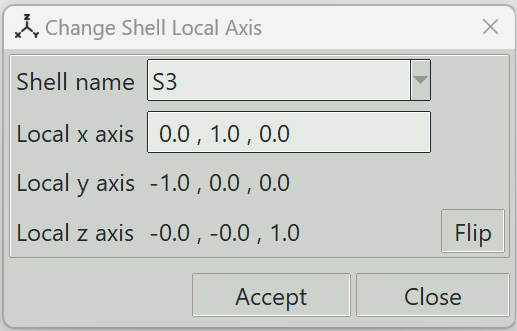
1. Shell name
Selects the shell for which you want to change the local axis.
2. Local x-axis
The i, j, k components defining a non-zero local x-axis vector. These values can be specified directly.
3. Local y-axis
The i, j, k components defining the local y-axis vector. These values are computed automatically and are read-only.
4. Local z-axis
The i, j, k components defining the local z-axis vector. These values are computed automatically and are read-only.
5. Flip button
Flips the direction of the local z-axis.
6. Accept button
Applies the changes to the shell's local axis.
7. Close button
Closes the window and ends the shell local axis modification command.