Shell Thermal Load Definition
This tab is used to define thermal loads that can be assigned to shells. The left pane displays a list of shell thermal loads available in the model, while the right pane shows the parameters of the selected load. The same area is also used to input parameters when creating a new shell thermal load.
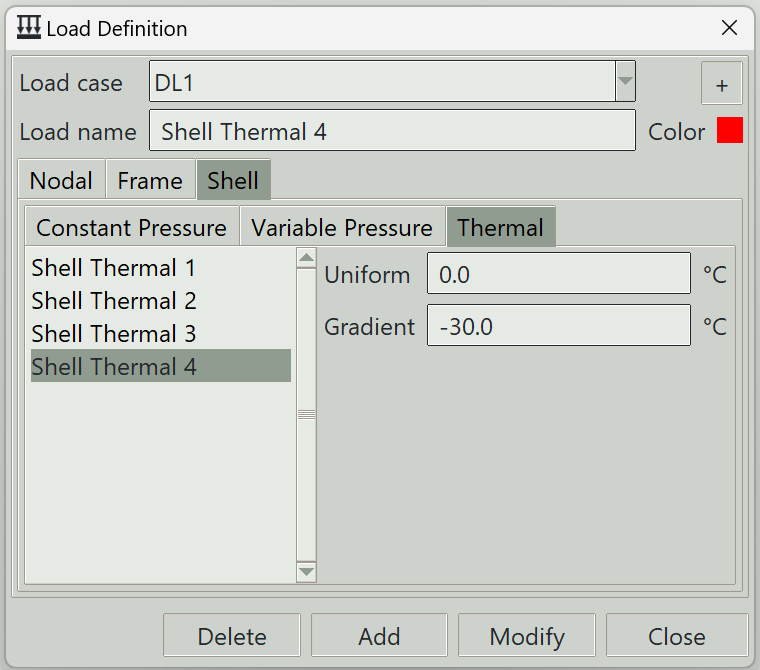
1. Load case
Select the load case under which this load is defined.
2. + button
Opens the load case definition window so that you can add a new load case.
3. Load name
A unique name for the load. It can be left blank, in which case the program will generate one automatically.
4. Color
The color assigned to this load for visualisation purposes.
5. Uniform
Represents a uniform temperature change of the shell relative to its surroundings. A positive value indicates that the shell is at a higher temperature than its surroundings, while a negative value indicates it is cooler.
6. Gradient
Represents the temperature difference across the thickness of the shell. It is defined as the temperature at top face minus the temperature at the bottom face. A positive value means the top face is hotter than the bottom face.
7. Delete button
Removes the selected load from the model.
8. Add button
Creates a new load using the specified parameters.
9. Modify button
Updates the parameters of the selected load.
10. Close button
Closes the window.