Analysis Options
This window is used to configure analysis settings and to start the analysis process. The options are grouped into three tabs, as shown in the image below.
1. General
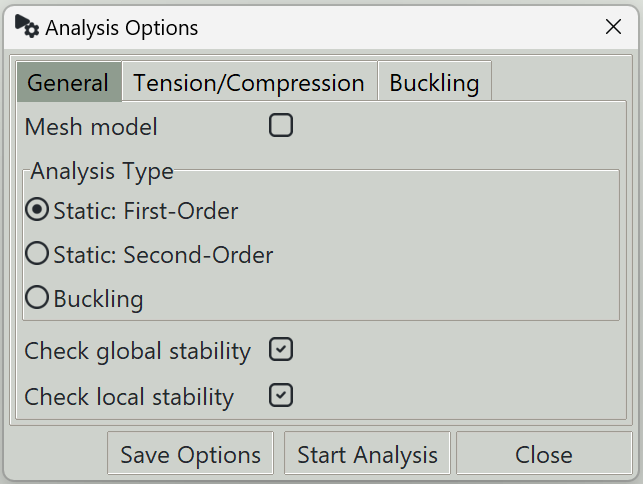
1.1 Mesh model
When enabled, the program will remesh the model before starting the analysis. This way the analysis uses the latest geometry and mesh settings. However, if you have already meshed the model and assigned some properties to nodes such as loads or supports, you have to turn this off inorder to retain those assignments.
1.2 Analysis type
You can select one of the following analysis types:
-
Static: First-order
Performs a first-order (linear) structural analysis, where equilibrium is evaluated on the undeformed geometry. If tension-only or compression-only members/supports are present, the program automatically switches to a nonlinear iterative solution to enforce these constraints. Otherwise, a purely linear analysis is performed. -
Static: Second-order (P-Delta)
Performs a second-order analysis (P-Δ analysis), where the effect of axial forces acting on the deformed structure is considered. Songeya uses the two-step approach:- A first-order analysis is performed to obtain internal forces.
- These forces are used to construct the geometric stiffness matrix.
- The geometric stiffness is combined with the elastic stiffness to form the global stiffness matrix, and the analysis is repeated.
Both global (P-Δ) and local (P-δ), the so-called P–"big-delta" and P–"small-delta" effects, are captured. The P-δ effects are captured by automatically introducing intermediate nodes along the member lengths.
The analysis also accounts for tension-only and compression-only behavior, and both frame and shell elements are supported.
-
Buckling: Linear
Performs a linear buckling analysis.
First, a linear static analysis is carried out to compute internal forces. These forces are then used to form the geometric stiffness matrix. An eigenvalue analysis is subsequently performed to determine buckling load factors and corresponding mode shapes.
1.3 Check global stability
When enabled, the program verifies that the structure has sufficient support conditions to maintain overall equilibrium (i.e., no rigid-body motion). If disabled, the analysis may still run, but the results are likely to be invalid. This option should only be turned off when you are confident in what you are doing.
1.4 Check local stability
When enabled, the program checks that all nodal degrees of freedom are adequately restrained to prevent instability. Although nodes are mathematical constructs, each node must be stable in all six degrees of freedom for the system of equations to be well-defined.
If disabled, the analysis may run faster, but unstable systems may produce meaningless results. This option should only be turned off when you are confident in what you are doing.
2. Tension/Compression
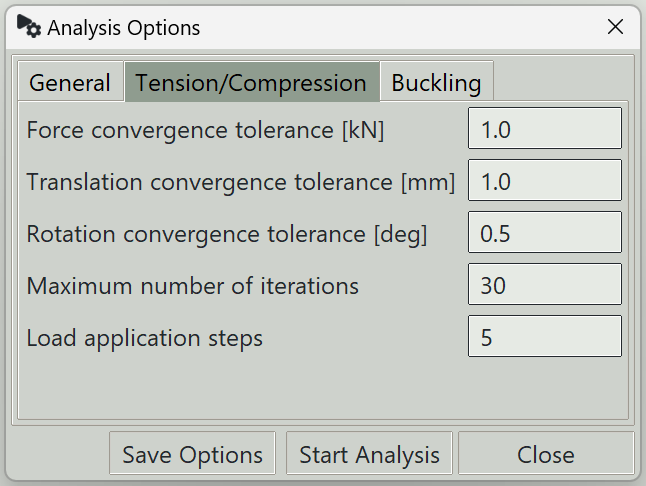
2.1 Force convergence tolerance
The convergence tolerance for axial forces in tension-only/compression-only members.
2.2 Translation convergence tolerance
The convergence tolerance for nonlinear elastic supports in translation.
2.3 Rotation convergence tolerance
The convergence tolerance for nonlinear elastic supports in rotation.
2.4 Maximum number of iterations
The maximum number of iterations allowed for tension-only/compression-only analysis.
2.5 Load application steps
Convergence is generally improved when loads are applied incrementally rather than all at once. This value specifies the number of load steps used during the analysis.
3. Buckling
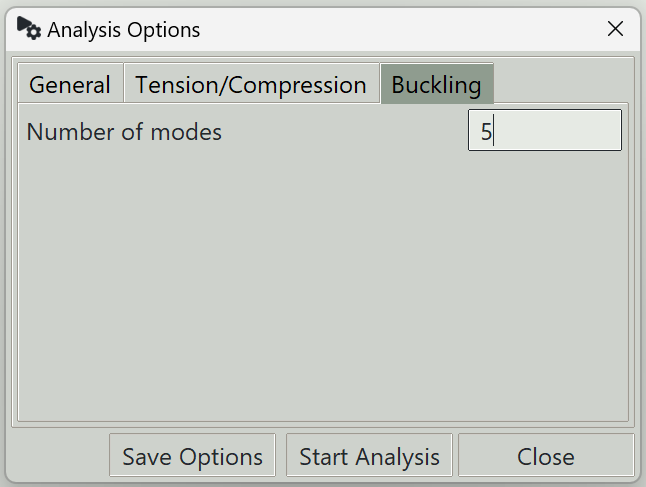
3.1 Number of modes
Specify the number of buckling modes to calculate for.
4. Save Options button
Saves the current analysis settings.
5. Start Analysis button
Saves the current settings and starts the analysis process.
6. Close button
Closes the window.