Shell Variable Pressure Load Definition
This tab is used to define variable pressure loads that can be assigned to shells. The left pane displays a list of shell pressure loads available in the model, while the right pane shows the parameters of the selected load. The same area is also used to input parameters when creating a new shell variable pressure load.
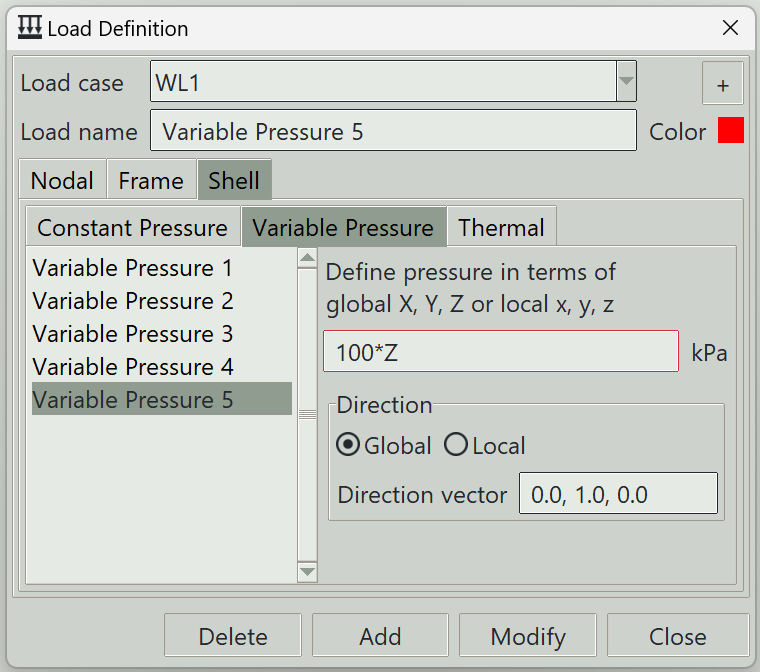
1. Load case
Select the load case under which this load is defined.
2. + button
Opens the load case definition window so that you can add a new load case.
3. Load name
A unique name for the load. It can be left blank, in which case the program will generate one automatically.
4. Color
The color assigned to this load for visualisation purposes.
5. Pressure equation
Defines the pressure as an equation in terms of X, Y, Z, x, y, or z. Uppercase variables refer to coordinates in the global coordinate system, while lowercase variables refer to coordinates in the local coordinate system of the shell. Common mathematical functions and symbols supported by Python can be used in the expression.
6. Direction
6.1 Direction vector
The i, j, k components of the vector that define the direction of the pressure.
6.2 Basis system
Whether the direction vector above is in the global coordinate system, or the local coordinate system of the shell.
7. Delete button
Removes the selected load from the model.
8. Add button
Creates a new load using the specified parameters.
9. Modify button
Updates the parameters of the selected load.
10. Close button
Closes the window.