Release Definition
This window allows you to define releases for a frame. The left pane of the window shows a list of available releases in the model. The right side displays the parameters of the selected releases. This is also where the parameters for a new property are entered.
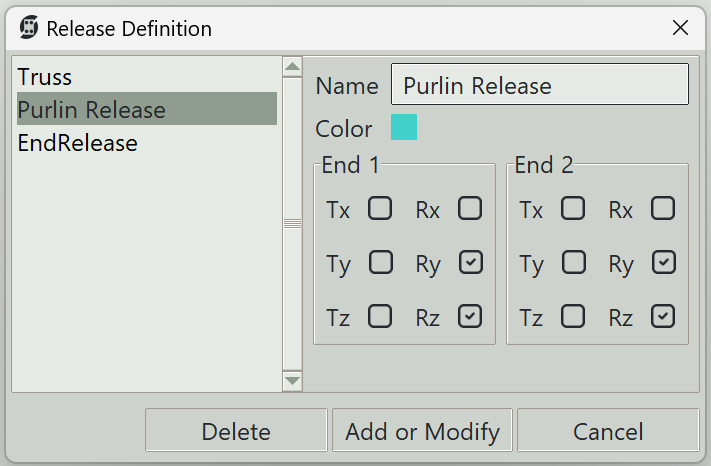
1. Name
A unique name for the release. It can be left empty, and the program will generate one automatically.
2. Color
A color to give to this release for visualisation.
3. Released degrees of freedom (dofs)
A number of checkboxes are available for each end of a frame element. There are a total of 12 checkboxes, representing the 12 dofs of a frame element. When a checkbox is checked, the concerned degree of freedom is released. This is the primary way to define a truss element element. You can release Rx and Ry on both ends of the frame to define a truss element. However, every dof for every node should atleast be constrained by something. Otherwise the mathematical model will not be correct and the results will be spurious. The program will ofcourse check this and give a warning. For a truss, it is customary to define only the diagonal elements as truss elements and leave the top and bottom chords as normal frame elements. This is not an issue if all the loads are applied at the nodes since the bending moments in the chords would be insignificant. This should ofcouse be confirmed during design.
Songeya uses static condesation to treat releases. Also note that during analysis, frames are further divided into sub-frames at all points of interest. However, the releases are only applied to the original ends of the frame.
The checkboxes have the following meanings:
- Tx: Translation in the local x-axis of the frame.
- Ty: Translation in the local y-axis of the frame.
- Tz: Translation in the local z-axis of the frame.
- Rx: Rotation about the local x-axis of the frame.
- Ry: Rotation about the local y-axis of the frame.
- Rz: Rotation about the local z-axis of the frame.
4. Delete button
Deletes the selected release.
5. Modify button
Modifies an existing releases property.
6. Add button
Adds a new release releases property.
7. Cancel button
Closes the window.