Reinforcement Definition
This window is used to define the properties of reinforcement bars. The left pane displays a list of reinforcement bars currently available in the model, while the right pane shows the properties of the selected bar. The same area is also used to input parameters when creating a new reinforcement bar.
Defining reinforcement is necessary if you intend to use it later in code checks. However, this step is optional, as reinforcement properties can alternatively be specified directly within the design script. Since users are expected to implement their own code-check logic, this feature may not be required in most cases.
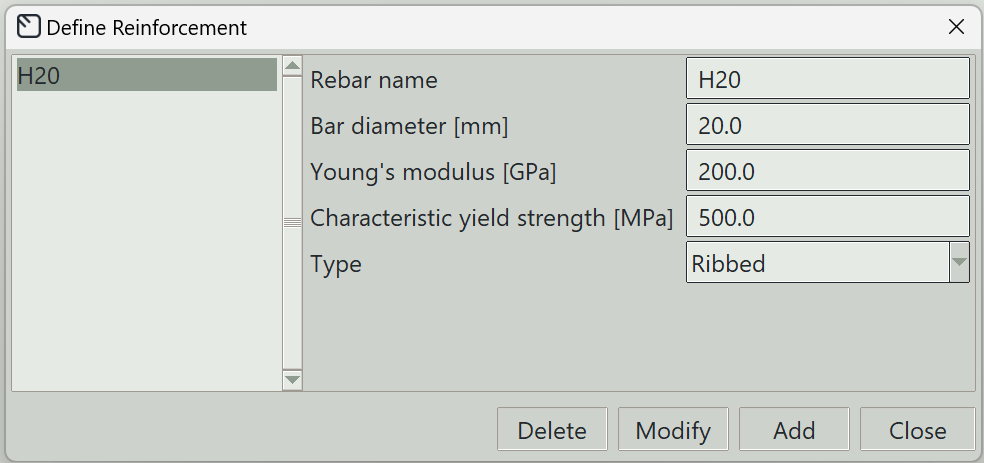
1. Rebar Name
A unique name for the reinforcement bar. It can be left empty, and the program will generate one automatically.
2. Bar Diameter
The nominal diameter of the reinforcement bar.
3. Young’s Modulus
The modulus of elasticity of the reinforcement material.
4. Characteristic Yield Strength
The specified yield strength of the reinforcement material.
5. Type
Specifies the type of reinforcement bar, which can be either round or ribbed.
6. Delete Button
Removes the selected reinforcement bar from the model.
7. Modify Button
Updates the properties of the selected reinforcement bar.
8. Add Button
Creates a new reinforcement bar using the specified parameters.
9. Close Button
Closes the window.