Radial Copy
This dialog is used to radially copy frames or shells. Copied elements retain some of their assigned properties. Copying is achieved by picking two points, which determine the axis around which the selected objects are copied. The rotation angle must be specified; otherwise, 90 degrees is assumed. Additional parameters can be set to fine-tune the copying process. Copying can also be performed by entering the required parameters and clicking the Accept button.
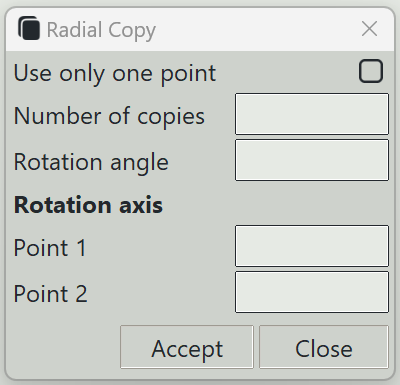
1. Use only one point
If checked, the axis of rotation will be determined using only one point. The axis will be perpendicular to the active drawing plane if working in the 3D window. If you are working in the 2D window, the axis of will be perpendicular to the 2D plane.
2. Number of copies
The number of copies to create. If unspecified, the program assumes one copy is required.
3. Rotation angle
The rotation angle for the copies.
4. Point 1
Three numbers specifying the coordinates of the first point of the axis of rotation.
5. Point 2
Three numbers specifying the coordinates of the second point of the axis of rotation.
6. Accept button
Starts copying the selected objects using the entered parameters.
7. Close button
Closes this dialog and exits the copying command.